Separate elapsed presence from allocated activity, and decide which one feeds the daily total. Overlap is fine in the calendar; double-counting is a reporting choice, not something the clock can resolve by itself.
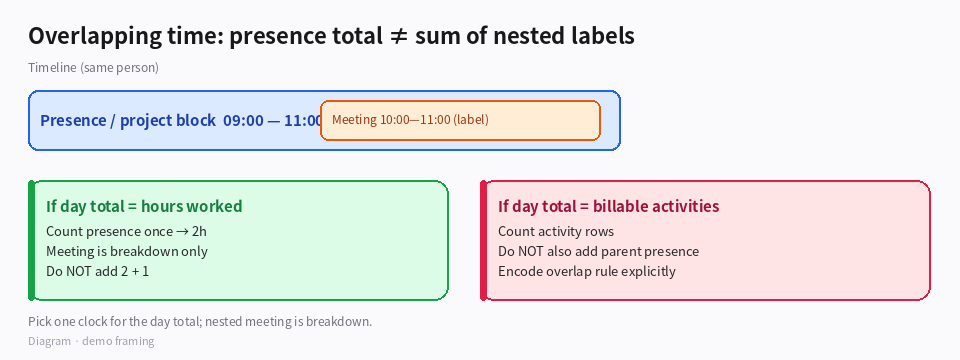
*Diagram · presence block vs nested meeting label*
Two clocks
| Concept | Meaning | Typical field |
|---|
| Elapsed / presence | Wall-clock time you were “on the clock” | workBlock start–end (e.g. 09:00–11:00 → 2h) |
| Allocated activity | How that time was labeled (project, meeting) | child rows or tags that may nest inside the block |
Your example: a 2-hour project block and a 1-hour meeting inside it.
- If the daily total means hours worked: count the presence block once (2h), and treat the meeting as a label/breakdown, not an extra +1h.
- If the daily total means billable by activity: count activities, but then do not also add the parent presence block.
- Avoid: summing every row’s duration when rows nest.
Modeling options in Busabase
- Parent time entry + child allocations (recommended)
- Parent: 09:00–11:00, type=
Presence, duration=2. - Child: 10:00–11:00, type=
Meeting, linked to parent; duration used for breakdown views only.
- Single presence row + multi-select / tags for activities (no second duration).
- Explicit
countsTowardTotal checkbox — only rows with it checked enter the day sum.
How to verify
- Enter the 2h project block and 1h nested meeting.
- Day total view must show 2, not 3, if you chose presence-based totals.
- Meeting breakdown view can still show 1h for “time in meetings.”
- Two non-overlapping entries (2h + 1h sequential) should total 3.
Boundaries
- Overlapping billable projects both claiming the same hour needs a business rule (split, primary wins, or forbid overlap)—encode it in validation or review, not only in charts.
- Imported calendar events often overlap; run a cleanup view: same person, overlapping intervals,
countsTowardTotal = true. - Agents logging time should be told which model you use so they do not create a second full-duration row for a meeting already inside a block.
If you say whether the day total is for payroll, billing, or capacity, we can pick one default rule and stick to it.

