Thanks for asking. When an external tool cannot read a Busabase record, read the HTTP status and error code first — do not rotate the API key on every failure. Auth problems, permission problems, and “missing record” look different.
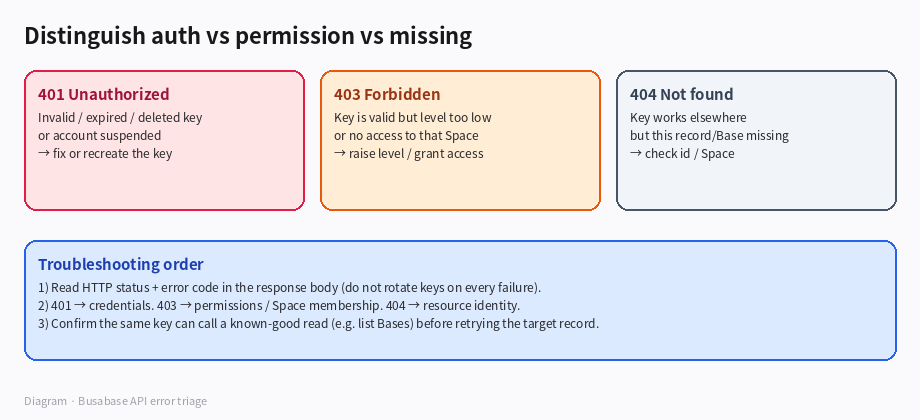
*Diagram · API error triage*
What each outcome usually means
| Response | Likely cause | What to do |
|---|
| 401 Unauthorized | Key invalid, expired, deleted, or the owner account is suspended | Fix or recreate the key; check expiry in Space settings → API keys |
| 403 Forbidden | Key is accepted, but its permission level is too low for the call, or the key’s owner has no access to that Space / resource | Raise the key level, grant Space access, or use a key that already can read there |
| 404 Not found | Credentials work, but this Base / record id is wrong or not in the Space you are calling | Confirm Space, Base, and record id; try a known-good list/read first |
Official matrix: API keys.
Practical troubleshooting order
- Capture status +
code / message from the response body (log them; do not only screenshot the client UI). - With the same key, call a cheap known-good read (for example list Bases you expect to see).
- If that already returns 401 → stop and fix credentials.
- If that works but the target record returns 403 → permissions / membership, not “bad key”.
- If that works but the target returns 404 → identity / wrong Space, not credentials.
- Only replace the key when you have a clear 401 (or you know the old key was revoked).
Boundaries
- A read-level key can authenticate and still get 403 on write/merge — that is expected, not a broken key.
- “Record does not exist” and “you may not see it” can both feel empty in a UI; trust the status code, not only the empty screen.
- Avoid embedding keys in shared logs; log status/code only.
If you paste one anonymized status + code (no key), we can narrow which of the three branches you are on.

