Keep the meeting note as the historical record, and add a separate correction that points back to it. Readers should always see what was originally written, what is current, and why it changed — never two “equally valid” decisions with no winner.
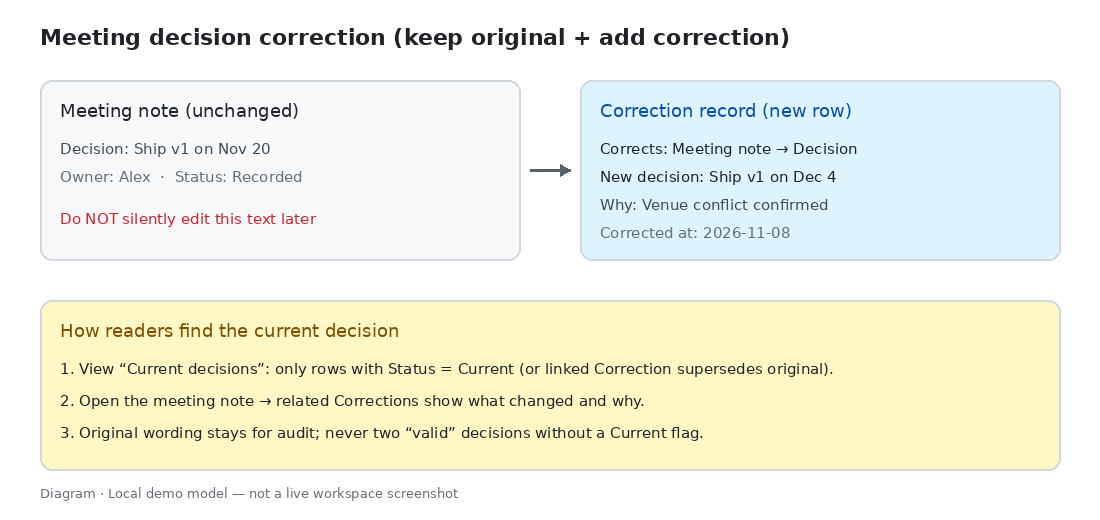
Recommended model
| Piece | Role |
|---|
| Meeting note (Doc or record) | Original context and the decision as first recorded — do not silently rewrite this text later |
| Correction (related row or linked Doc) | New decision text, reason, who corrected, when |
| Current flag / Status | Mark which decision is Current; the original becomes Superseded (or leave original Status = Recorded and only Corrections carry Current) |
A link from Correction → Meeting note (and optionally “Corrects field: Decision”) makes the trail obvious on both sides.
Day-to-day
- Leave the meeting note wording as it was after the meeting.
- When someone clarifies a mistake, add a Correction instead of editing the decision sentence in place.
- Set the Correction (or a “Current decision” view) so the latest corrected wording is what people open first.
- In the meeting note, show related Corrections so anyone reading the original still sees the update and the reason.
How to verify
- Opening the meeting still shows the original sentence.
- A “Current decisions” view shows only one active wording per topic.
- The Correction row answers “what changed / why / who / when” without archaeology in edit history.
Boundaries
- Soft-deleting or overwriting the original removes the audit trail readers need.
- Two Current decisions for the same topic is the failure mode you called out — enforce with a view or a single “current correction” link.
- Tiny typos in non-decision prose can be edited in place; decision outcomes should use Corrections.
Example goal for an Agent
If a meeting decision was wrong, create a Correction linked to that meeting with the new decision, reason, and timestamp. Do not overwrite the original decision text. Ensure only one Current decision remains for that topic.
That keeps context, correction, and “what we follow now” separable.