“Full access” changes how freely the Agent acts in this conversation. It does not expand what the connected Agent is authorized to reach.
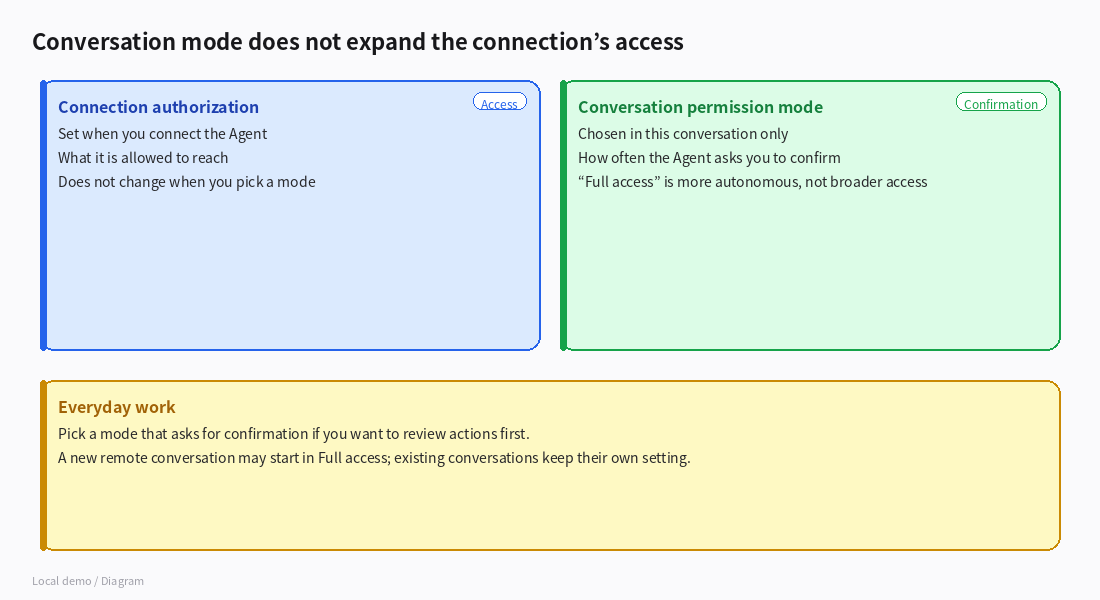
Two different layers
In Busabase, supported Agents can use a permission mode inside a conversation. That mode is separate from the connection itself:
- Connection authorization is set when you connect the Agent. It determines what the Agent is allowed to access in the workspace.
- Conversation permission mode is chosen in that conversation. It determines how often the Agent asks you to confirm before it acts.
Switching a conversation to Full access does not grant the connection new folders, tables, or workspace rights. It means this conversation will follow the Agent’s more autonomous mode — typically asking for fewer confirmations — while still staying inside the access the connection already has.
A more cautious mode does the reverse: the Agent still has the same authorized access, but it will ask you to confirm more often.
What stays independent
Each conversation keeps its own mode. Changing one conversation does not rewrite another. New remote conversations may start in the Agent’s Full access option; existing conversations keep the choice you already made.
For everyday work, pick the mode that matches how closely you want to review actions:
- Use a mode that asks for confirmation when you want to approve steps as they happen.
- Use Full access when you already trust the connection’s access and want fewer interruptions in that conversation.
How to verify
- Open two conversations with the same Agent and set different modes — each should keep its own setting.
- In Full access, notice that you are asked to confirm less often, while the Agent still only works with what the connection can already reach.
- If the Agent cannot open something, changing the conversation mode will not create that access; the connection or sharing settings need to allow it.
Boundaries
- Permission modes appear only when the Agent supports them.
- Full access is not a way to bypass workspace permissions or open content the connection was never authorized to use.
- If you need stricter access, change what the connection is allowed to use; if you need more review, change the conversation’s mode.
Example goal for an Agent
Explain the permission mode in this conversation and keep working only within the current connection’s access. If you need me to confirm an action, ask; do not treat Full access as permission to reach files or tables this connection cannot already use.