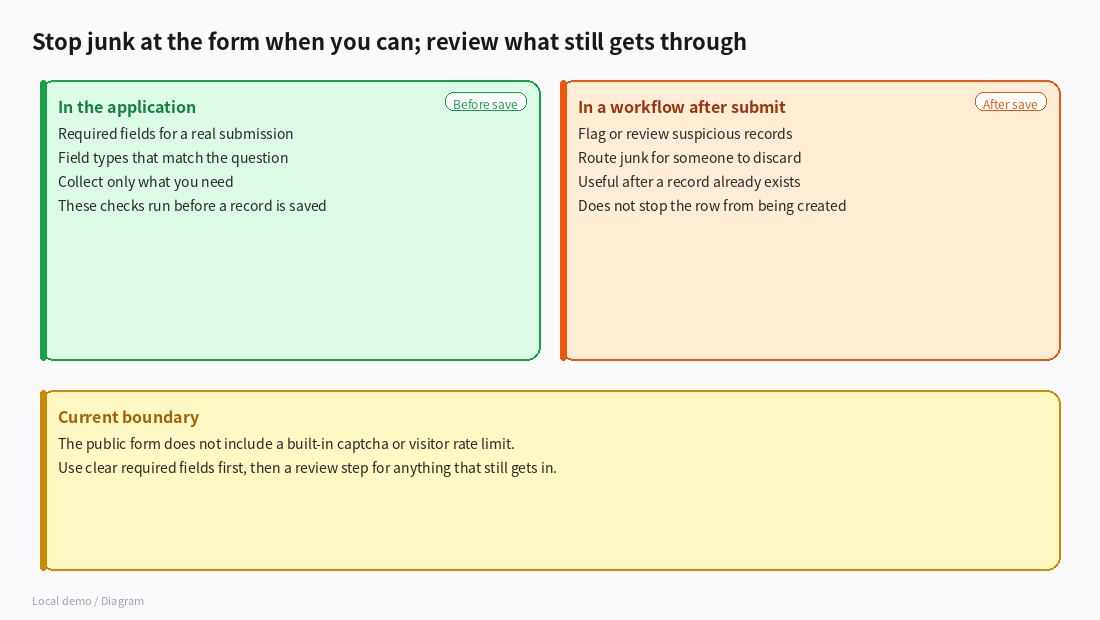
Put the checks that decide whether a submission is valid in the AirApp form itself. Use a workflow afterward to review or flag records that still get through — it cannot stop the row from being created.
What to configure before you share the website
A published AirApp website is view-only until visitor submissions are set up. Before you share a public form:
- Collect only the fields you actually need. Extra optional fields make it easier to leave junk.
- Mark the fields a real visitor must answer as required.
- Use field types that match the question, so obviously empty or the wrong kind of value is harder to submit.
- Preview the form as a visitor and confirm a complete, legitimate submission can be sent without extra friction.
The public form does not currently include a built-in captcha or a visitor rate limit. Legitimate visitors should still be able to submit by filling the required fields you defined.
What belongs in the application, not the workflow
These checks belong in the app, because they run before a record is saved:
- Required fields
- Field types and the questions themselves
- Whether visitors are allowed to submit at all
A workflow that runs after submission can review, label, or route a record — for example marking something for manual checks, or sending an obviously irrelevant entry to a review view. By then, the record already exists in the workspace. That is useful cleanup, but it is not the same as blocking the submission at the form.
A practical setup
- In the form: keep required fields clear and specific, so most automated or empty entries fail before they are saved.
- In the workspace: add a review view or workflow for submissions that still look irrelevant, so they do not sit mixed with real work.
- When you publish: confirm you are ready to receive visitor records, then share the site.
How to verify
- Try submitting the public form with a required field left empty — it should not create a record.
- Send one complete legitimate submission and confirm it appears in the workspace table.
- If you added a review step, send a clearly irrelevant test entry and confirm it is flagged or sorted away from the main work queue.
Boundaries
- There is no built-in captcha or public rate limit to turn on before sharing the site.
- A workflow cannot prevent a record from being created; it can only help you handle it afterward.
- Making the form harder to complete will also affect legitimate visitors, so add only the required fields you truly need.
Example goal for an Agent
Review this public AirApp submission form. Make sure the fields a real visitor must answer are required, and set up a review view or workflow for submissions that still look irrelevant after they are saved. Do not add extra steps that would block a complete legitimate submission.