Thanks for asking. In Busabase, treat a conditional plan and a final commitment as different statuses on the same decision record — and keep the if / then / else text on the record so colleagues do not have to reread the chat.
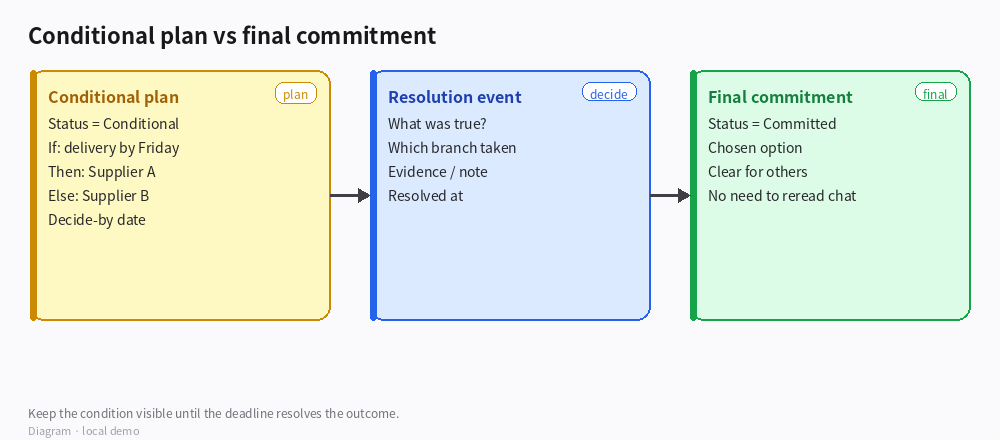
*Diagram · Conditional plan → resolution → commitment*
Recommended fields (one Decision record)
| Field | Purpose |
|---|
| Title | Short name (“Supplier choice for Q4 kit”) |
| Status | Conditional → Committed (add Expired / Superseded if useful) |
| Condition | The “if” in plain language (“delivery confirmed by Friday”) |
| If true / If false | The two branches (Supplier A / Supplier B) |
| Decide-by | Deadline when the condition must be resolved |
| Chosen option | Filled only when status becomes Committed |
| Resolution note | What was actually true, evidence link, who decided |
Optional: a small Resolution events table (one row per check-in) related to the Decision, if the condition is checked more than once before the deadline.
How to use it
- When the team only has a plan: create the Decision with status Conditional, fill Condition + both branches + Decide-by. Leave Chosen option empty.
- Views for execution (purchase orders, tasks) should filter Status = Committed so conditional plans never look like approved work.
- When the deadline arrives (or earlier): write the Resolution note, set Chosen option, change Status to Committed.
- If the condition expires without a choice, mark Expired and open a new Decision rather than silently editing history.
How to verify
- Open the Decision: a new teammate can see the condition and both branches without opening comments.
- Task / PO lists do not show Conditional rows as if they were already approved.
- After commit, Chosen option and Resolution note are filled; Status is Committed.
Boundaries
- Do not put the final choice only in a long “Notes” field while Status still says Conditional — that is how plans get mistaken for commitments.
- Busabase does not auto-evaluate natural-language conditions; the people resolve the if/then and update the record (or an Agent you instruct to do so after checking evidence).
- If you need a full audit trail of every intermediate check, use related Resolution events instead of overwriting the Condition text.
If you share whether this lives in a Project Base or a shared Decisions Base, we can suggest a minimal view set (Conditional queue vs Committed history).

