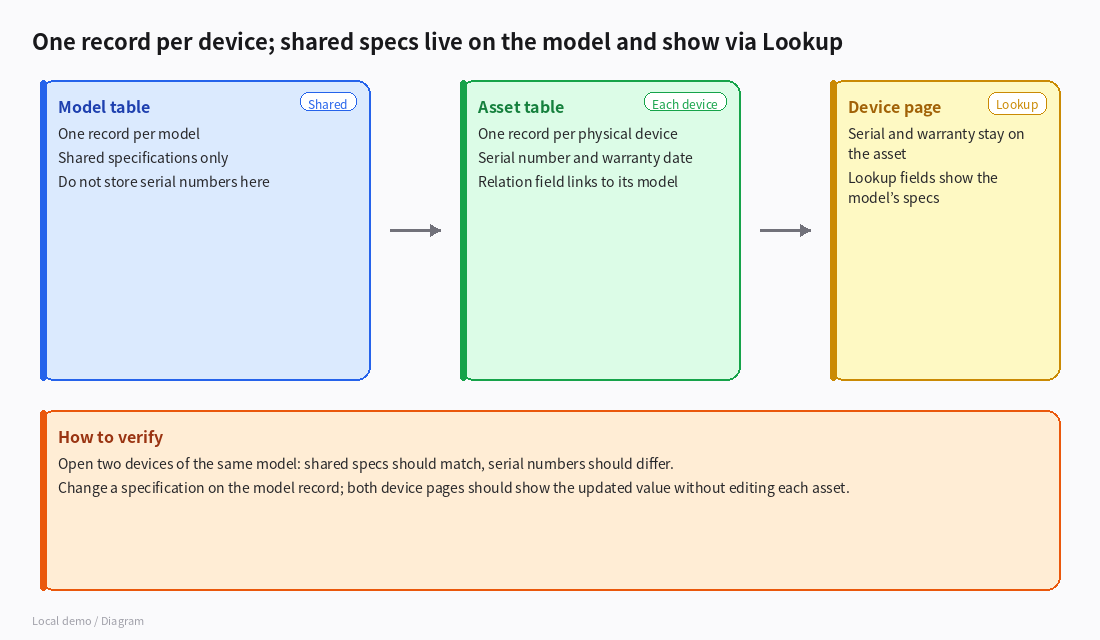
Yes. Put shared specifications in a model table, and record each physical device separately in an asset table — serial number and warranty date belong on the asset. Link each device to its model with a Relation field, then add Lookup fields so those specifications appear when you open an individual device.
How to set it up
In Busabase:
- Create a model table with one record per model, and keep only the shared specifications there. Do not store serial numbers or warranty dates on the model.
- Create an asset table with one record per physical device. Add fields for the serial number and warranty date.
- On the asset table, add a Relation field that points to the model table, and link each device to the correct model.
- Still on the asset table, add Lookup fields that use that relation to bring in the model’s specifications. When you open a device, you should see both the device’s own fields and the looked-up specs.
You do not copy the specifications onto every asset. If a specification changes for the model, update the model record; the linked devices should then show the new value.
How to verify
- Open two devices of the same model: the looked-up specifications should match, and the serial numbers and warranty dates should differ.
- Change one specification on the model record, then reopen both devices — both should show the updated value without editing each asset.
- A device linked to a different model should show that model’s specifications instead.
Boundaries
- If one physical device has an exception (for example a unique accessory), store that exception on the asset, not by changing the shared model.
- A Lookup only shows values from the linked model. If the Relation is empty, the specifications will not appear.
- Title fields still help you recognize each record: use the model name on the model table, and a serial number or asset name on the asset table.
Example goal for an Agent
Create a model table for shared specifications and an asset table with one record per physical device, including serial number and warranty date. Link each asset to its model with a Relation field, and add Lookup fields so the model’s specifications appear on the device record. Do not duplicate those specifications on every asset.