Keep the company billing name and address in the payment account. Use each workspace’s Billing page for that workspace’s plan, usage, and payment history.
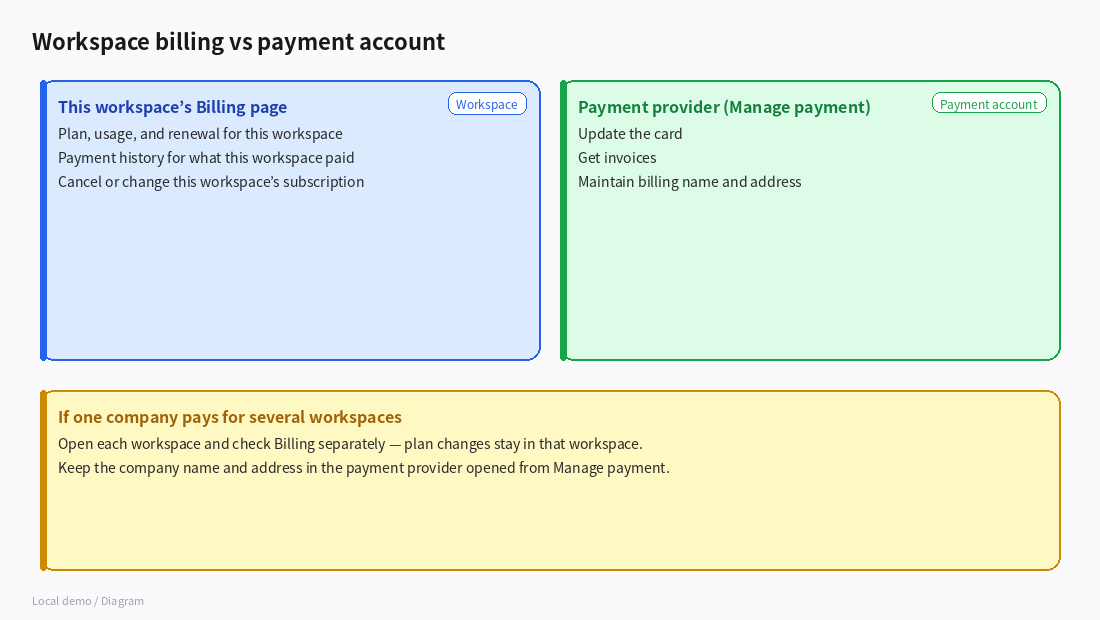
What belongs to the workspace
A Busabase Cloud subscription belongs to a specific workspace. Open that workspace first, then go to Settings → Space Settings → Billing. Owners and admins will see:
- The plan, usage, and renewal or end date for this workspace
- A payment history of what this workspace has paid
- Actions that change only this workspace’s subscription, such as canceling it
If you manage more than one workspace, switch to the correct one before paying or canceling. Changing the plan or canceling on this page does not switch another workspace’s subscription.
What belongs to the payment account
From the same Billing page, Manage payment opens the payment provider. That is where you:
- Update the card
- Get invoices
- Maintain the billing name and address
Those details are not stored as a separate company profile inside each workspace. They live with the payment account that collected the payment.
If one company pays for several workspaces
- Keep the official billing name and address in the payment provider, using Manage payment from a workspace that already has a paid subscription.
- Review each workspace’s Billing page on its own for plan, seats, usage, and that workspace’s payment history.
- When you change a card or billing address in the payment provider, check whether other subscriptions that use the same payment account should keep the same details.
- When you only need to change one workspace’s plan or cancel it, stay on that workspace’s Billing page.
After each successful payment, the provider also emails a receipt to the address used at checkout. You can request an invoice from the provider portal opened by Manage payment.
How to verify
- Switch between two workspaces and open Billing in each — the plan and history should match that workspace, not the other one.
- Use Manage payment to confirm the billing name and address you want on invoices.
- After a payment, check both the workspace payment history and the receipt email.
Boundaries
- Only an owner or admin of the target workspace can manage its billing.
- The merchant name on a statement may appear as the payment provider (for example
CREEM.IO or similar), not only as Busabase. - Canceling a workspace subscription takes effect at the end of the current billing period; it does not automatically refund that period.
Example goal for an Agent
Help me review billing for this workspace: show the current plan and payment history on its Billing page, then tell me how to open Manage payment to check the company billing name and address. Do not change another workspace’s subscription.